
ENTERPRISE SEO BLOG
How to Do an Enterprise SEO Audit: The 9-Phase Framework for Sites With 100,000+ URLs
 Ganesh Shanmugam21 min read
A step-by-step enterprise SEO audit process for sites with 100,000+ URLs. Crawl at scale, close indexation gaps, read log files, and ship a roadmap engineering will accept.
Quick Answer
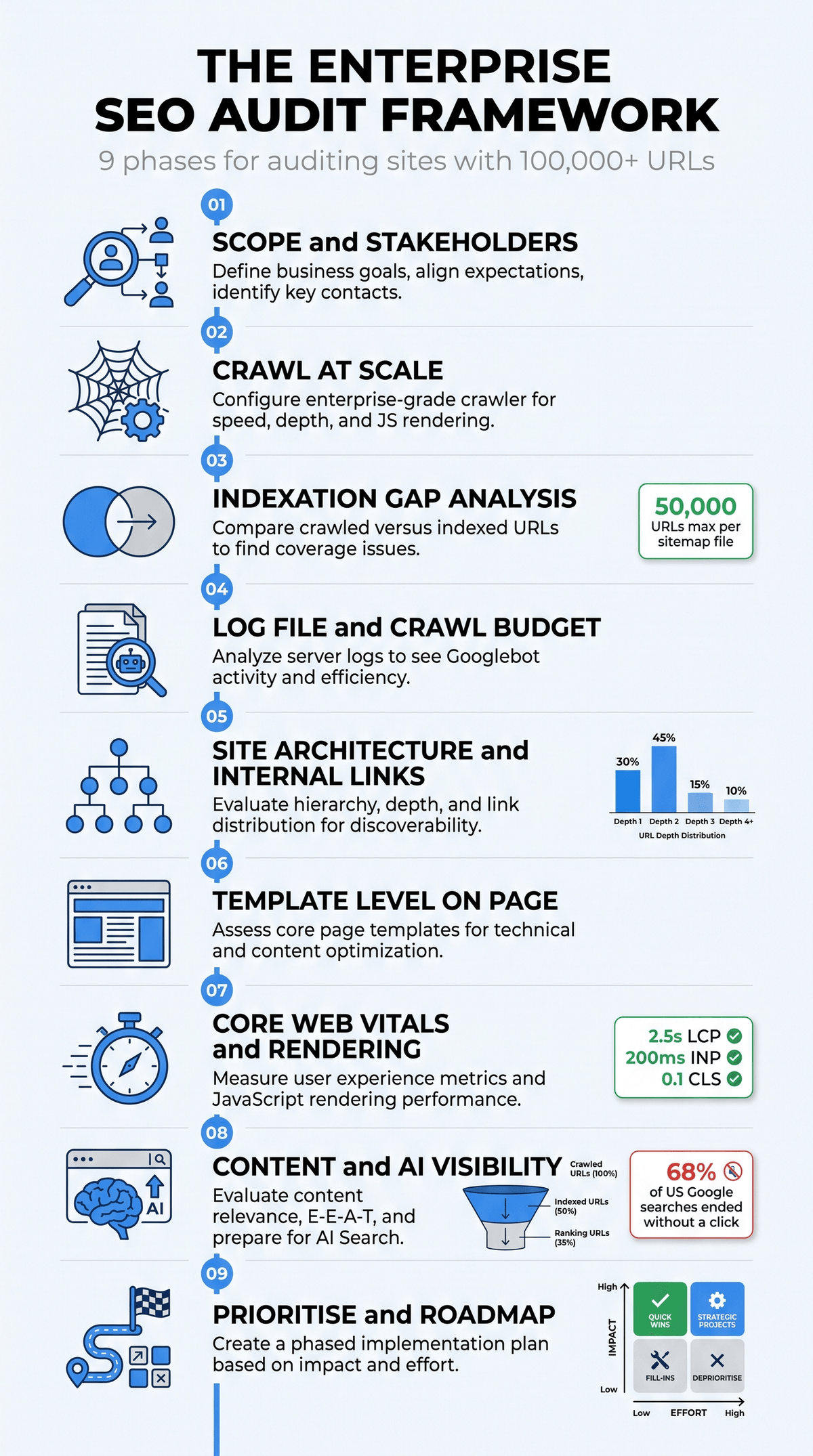
To do an enterprise SEO audit, work in nine phases: define scope and stakeholders, crawl the site at scale with a distributed crawler, run an indexation gap analysis against Google Search Console, analyse server log files for crawl budget waste, map site architecture and internal links, audit on-page elements at the template level, measure Core Web Vitals and JavaScript rendering, assess content quality and AI visibility, then score every finding by revenue impact against development effort and convert it into a ticketed roadmap. The whole cycle takes 3 to 6 weeks on a site with 100,000 to 10 million URLs. The audit is not the deliverable. The prioritised, ticketed roadmap is.
Key Takeaways
- Enterprise audits are pattern audits, not page audits. On a 2 million URL site you never fix pages. You fix templates, CMS rules and rendering behaviour, and each fix propagates across hundreds of thousands of URLs at once.
- Crawl data alone will mislead you. A crawler tells you what exists. Server logs tell you what Googlebot actually spent its time on. The gap between those two datasets is where most enterprise organic revenue is lost.
- Google publishes clear crawl budget triggers. Sites with over 1 million unique pages that change moderately often, and sites with over 10,000 unique pages that change daily, are the ones Google says need to manage crawl budget actively.
- Core Web Vitals thresholds are fixed and public. LCP within 2.5 seconds, INP at 200 milliseconds or less, CLS at 0.1 or less, all measured at the 75th percentile of real user loads.
- Search now leaks clicks. SparkToro analysis of Similarweb clickstream data found 68.01% of US Google searches ended without a click between January and April 2026, up from 60.45% in 2024. Your audit needs an AI visibility section or it is auditing yesterday's SERP.
- Findings that cannot become tickets are opinions. Every P1 item needs a URL pattern, an affected URL count, sessions and revenue at risk, expected behaviour, acceptance criteria and an owning team.
What an Enterprise SEO Audit Actually Is
An enterprise SEO audit is a structured diagnostic of a large, complex website, usually 100,000 URLs or more, that evaluates crawlability, indexation, site architecture, on-page implementation, page experience, content quality and authority signals, and then converts every finding into a prioritised engineering roadmap tied to business outcomes.
The word that matters in that definition is scale. A 300 page site has 300 problems you can list in a spreadsheet. A 3 million page site has perhaps 40 real problems, each replicated across a template that generates 80,000 URLs. Enterprise SEO auditing is the discipline of finding the 40 patterns instead of listing 400,000 symptoms.
There is a second, less technical difference. On a small site the hard part is knowing what to fix. On an enterprise site the hard part is getting the fix shipped. Your audit competes for sprint capacity against a checkout redesign, a payment integration and a security patch. If the document does not speak in revenue, risk and effort, it will sit in a Drive folder for two quarters. That is why a serious enterprise SEO audit is scoped as a change management exercise as much as a technical one.
Enterprise SEO audit vs standard SEO audit
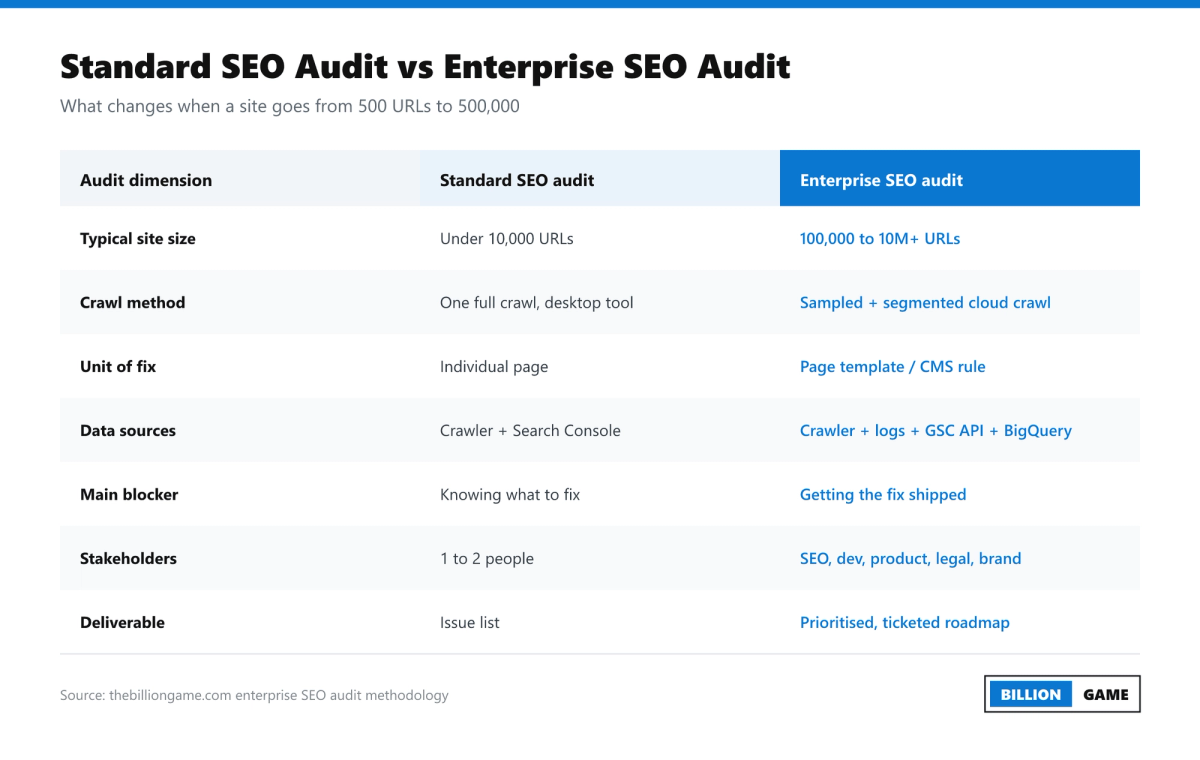
| Dimension | Standard SEO audit | Enterprise SEO audit |
|---|---|---|
| Typical site size | Under 10,000 URLs | 100,000 to 10 million+ URLs |
| Crawl method | One full crawl on a desktop tool | Segmented, sampled, scheduled cloud crawls |
| Unit of fix | Individual page | Page template or CMS rule |
| Core data sources | Crawler plus Search Console | Crawler, server logs, GSC API, BigQuery, CrUX, analytics |
| Main constraint | Knowing what to fix | Getting the fix into a sprint |
| Stakeholders | One or two people | SEO, engineering, product, content, legal, brand, regional teams |
| Deliverable | An issue list | A scored, ticketed, sequenced roadmap |
| Realistic timeline | 3 to 10 hours | 3 to 6 weeks |
Before You Start: Scope, Data Stack and Access
Most enterprise audits fail before the first crawl, because the auditor started crawling before agreeing what success looks like.
Agree the commercial question first
Do not open with "we will audit the site". Open with the question the business actually wants answered. In practice it is one of these:
- Organic revenue has declined for three consecutive quarters and nobody can explain why.
- We migrated platforms and lost 30% of non-brand traffic.
- We publish 4,000 new URLs a month and Google indexes a fraction of them.
- We are about to replatform and want to know what to protect.
- Our competitors appear in AI Overviews and we do not.
Every one of those questions changes what you weight in the audit. A post-migration audit lives in redirect maps and log files. An indexation question lives in crawl budget and template quality. Write the question at the top of the document and answer it explicitly in the executive summary.
Assemble the data stack
An enterprise audit is a data join. You need at minimum:
- A distributed crawler, for example Screaming Frog in database storage mode, Sitebulb, Lumar, Botify, OnCrawl or JetOctopus. Desktop-only crawlers will hit memory limits on multi-million URL sites.
- Raw server access logs, ideally 30 to 90 days, containing timestamp, requested URL, HTTP status code, user agent, bytes served and response time. Pull them from the CDN, Cloudflare, Akamai, Fastly or the origin web server.
- Google Search Console, at both property and folder level. The UI caps most reports at 1,000 rows, so use the Search Analytics API, which returns up to 25,000 rows per request, or the bulk data export into BigQuery for full-fidelity data.
- Analytics, GA4 or Adobe, mapped so you can attribute sessions and revenue to URL patterns rather than individual pages.
- Field performance data from the Chrome UX Report, plus PageSpeed Insights and Lighthouse for lab diagnostics.
- A backlink source such as Ahrefs, Semrush or Majestic for authority and internal link modelling.
Get access approved on day one
Log file extraction usually needs a DevOps ticket, and that ticket usually takes a week. Request it before you do anything else. The same applies to Search Console permissions on every regional and subdomain property, which on a global brand can mean 40 separate properties.
Segment before you measure
Segment the URL inventory by template and by commercial value before you look at a single error. A typical ecommerce segmentation looks like: homepage, category, subcategory, faceted, product detail, search results, editorial, help centre, account, and legal. Every metric from here on gets reported by segment. A 14% index rate is meaningless. A 14% index rate on product detail pages that carry 61% of organic revenue is a board level problem.
Phase 1: Scope and Stakeholders
Define, in writing, four things: which domains, subdomains and regions are in scope; which templates are in scope; what data window you will use; and who owns each fix category.
Map the fix owners now, not at the end. Canonical logic sits with platform engineering. Title tag templates often sit with the CMS or merchandising team. Hreflang usually sits with the regional teams. Robots directives may need infosec sign off. Naming the owner in the audit document is what converts a finding into a ticket.
Set a decision rule for disagreements too. When SEO says a facet should be disallowed and merchandising says it drives revenue, the tie-breaker should be data, agreed in advance: does the facet URL pattern generate non-brand impressions and assisted revenue over the last 90 days?
Phase 2: Crawl at Scale
The crawl configuration on an enterprise site is itself a decision that changes your findings.
Set the crawler up like this:
- Crawl as Googlebot smartphone. Mobile-first indexing means the mobile rendering of the page is the page Google evaluates.
- Enable JavaScript rendering, but also run a parallel raw HTML crawl. The delta between the rendered DOM and the raw HTML is one of the highest value datasets in the entire audit, because it shows what depends on client-side execution.
- Respect robots.txt on the first pass so your crawl mirrors Googlebot's constraints. Run a second, ignore-robots crawl to see what is hidden behind those rules.
- Set crawl rate in agreement with DevOps and crawl outside peak traffic hours. A 40 URL per second crawl against a production origin has taken sites down before.
- Connect the crawler to Search Console, analytics and your XML sitemaps so every URL row carries clicks, impressions, sessions and sitemap membership.
- On sites above roughly 2 million URLs, crawl by segment on a rotation rather than attempting a single full crawl.
What to extract on the way through: status codes, indexability status, canonical target, meta robots, hreflang cluster, title, H1, word count, click depth, inlink count, structured data types, response time and page size.
Two size limits are worth knowing while you review page weight. Google's crawler documentation states a 15 MB default limit across Google's crawlers and fetchers, and in a February 2026 documentation clarification Google specified 2 MB for supported file types and 64 MB for PDFs when crawling for Google Search. Most HTML documents are nowhere near either number, but bloated enterprise templates with inlined JSON state have hit them, and anything past the cutoff is simply not considered.
Phase 3: Indexation Gap Analysis
This is where enterprise audits earn their fee. You are comparing four URL sets and reading the gaps between them.
- URLs discoverable by crawl (what your architecture exposes)
- URLs submitted in XML sitemaps (what you claim matters)
- URLs Googlebot has requested (from logs)
- URLs indexed (from the Search Console Page Indexing report and the URL Inspection API)
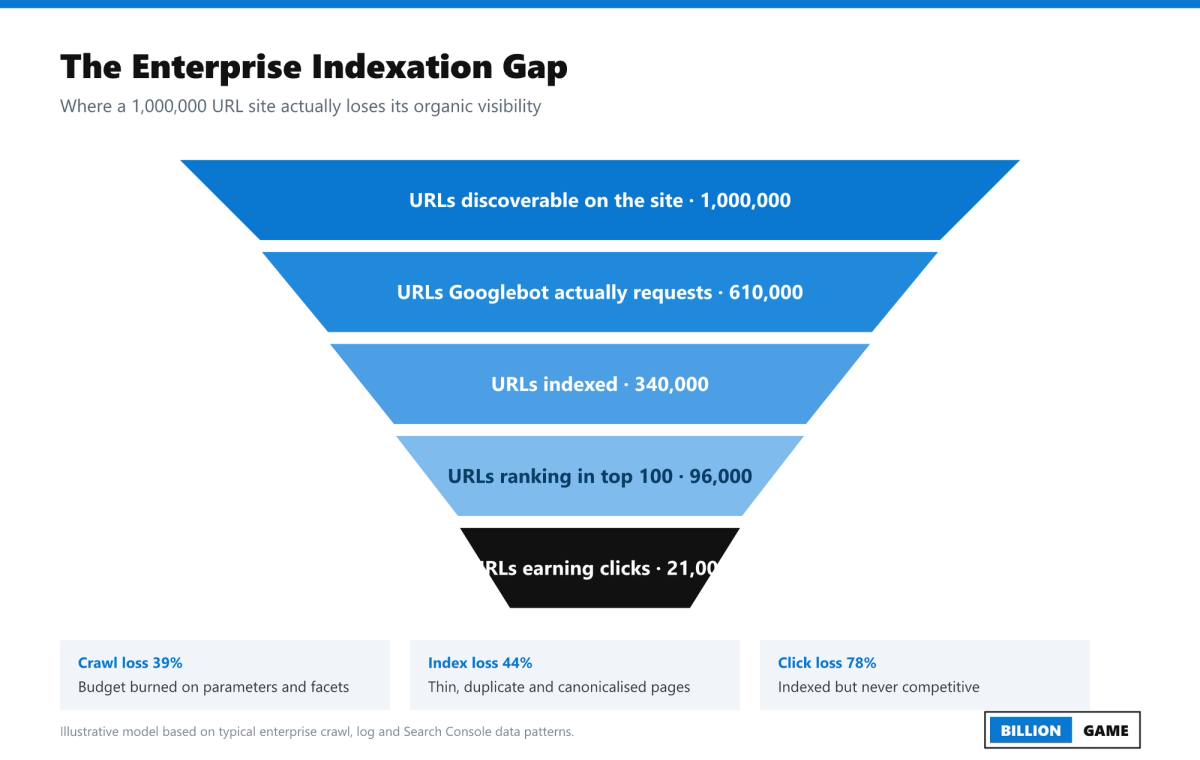
Each gap has a distinct diagnosis:
- In sitemap, never crawled. Discovery problem. Usually orphaned URLs with no internal links, or sitemap files that are stale, oversized or not referenced in robots.txt. Remember the hard limits: 50 MB uncompressed or 50,000 URLs per sitemap file. Also note that Google ignores <priority> and <changefreq> entirely, and only uses <lastmod> when it is consistently and verifiably accurate. A CMS that stamps today's date on every page every night is actively training Google to ignore your sitemaps.
- Crawled, not indexed. Quality or duplication problem. The page was seen and rejected. This is the single most common enterprise indexation state, and it almost always traces back to templated thin content, near-duplicate variants or pages that add nothing beyond a database record. Our full walkthrough on fixing Crawled, currently not indexed in GSC covers the diagnostic sequence in detail.
- Discovered, not indexed. Crawl budget or perceived value problem. Google knows the URL exists and has chosen not to spend a request on it. Google's own crawl budget guidance names exactly this state as a signal that crawl budget management is required.
- Indexed but should not be. Index bloat. Search results pages, faceted combinations, session parameters, paginated tails, staging subdomains, print variants, tracking URLs. Index bloat dilutes crawl demand and buries the templates that matter.
Quantify each bucket by segment and by revenue. "412,000 URLs in Discovered, currently not indexed" is a fact. "412,000 URLs in Discovered, currently not indexed, of which 89,000 are live product pages representing an estimated 4,100 monthly sessions" is a business case.
Phase 4: Log File Analysis and Crawl Budget
Google states that crawl budget is a function of two things: the crawl capacity limit, which is how much crawling your server can absorb without degrading, and crawl demand, which is how much Google wants your content based on inventory, popularity and staleness.
Google is also specific about who needs to care. Its large site guidance names three groups: large sites of 1 million or more unique pages with content that changes moderately often, medium or larger sites of 10,000 or more unique pages with content that changes daily, and sites with a large share of URLs reported as Discovered, currently not indexed.
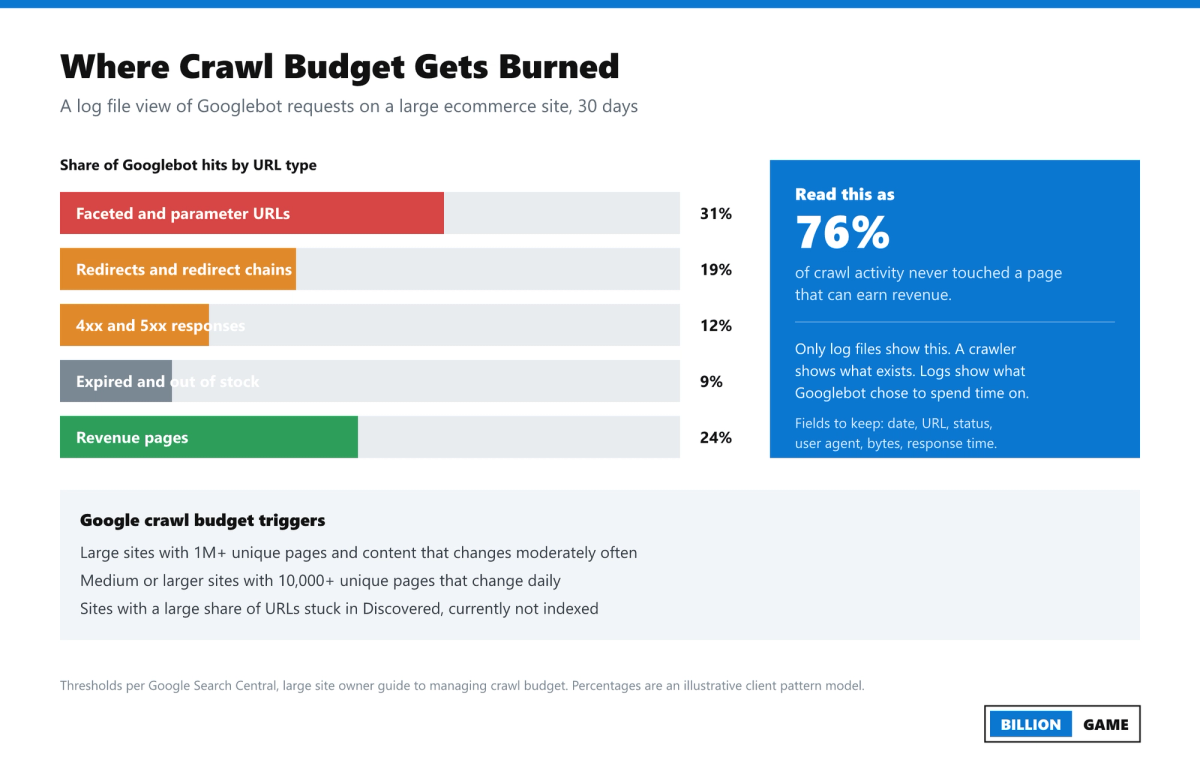
Pull these six numbers from your logs:
- Crawl distribution by segment. What share of Googlebot requests hits revenue templates versus facets, parameters, search pages and dead ends?
- Status code distribution over time. A rising 5xx share is a crawl capacity emergency, not an SEO nice-to-have.
- Crawl frequency by click depth. Frequency reliably decays with depth. This is your evidence for architecture change.
- Orphan URLs receiving Googlebot hits. Pages Google crawls that your internal link graph does not expose.
- Never-crawled revenue URLs. Money pages Googlebot has not requested in 30 days.
- Average response time by template. Google slows crawling on slow servers, so response time is an indexation lever, not just a UX one.
Then act on Google's published best practices: consolidate duplicate content, block genuinely unhelpful URLs with robots.txt rather than noindex if the goal is to save crawl budget (a noindex page must still be crawled to be seen), return 404 or 410 for permanently removed pages, keep sitemaps current with accurate lastmod, support HTTP 304 Not Modified responses so unchanged pages cost fewer bytes, and eliminate long redirect chains.
Faceted navigation deserves its own worked decision. For each facet type, decide one of four states: indexable and linked, indexable but not linked, crawlable but canonicalised, or disallowed in robots.txt. Document the rule per facet, then verify the implementation matches the rule. Almost every large ecommerce site we audit has facets in a fifth undocumented state that nobody chose.
Phase 5: Site Architecture and Internal Links
Internal linking is the most underused lever in enterprise SEO, because it is the one lever the SEO team can often pull without a platform release.
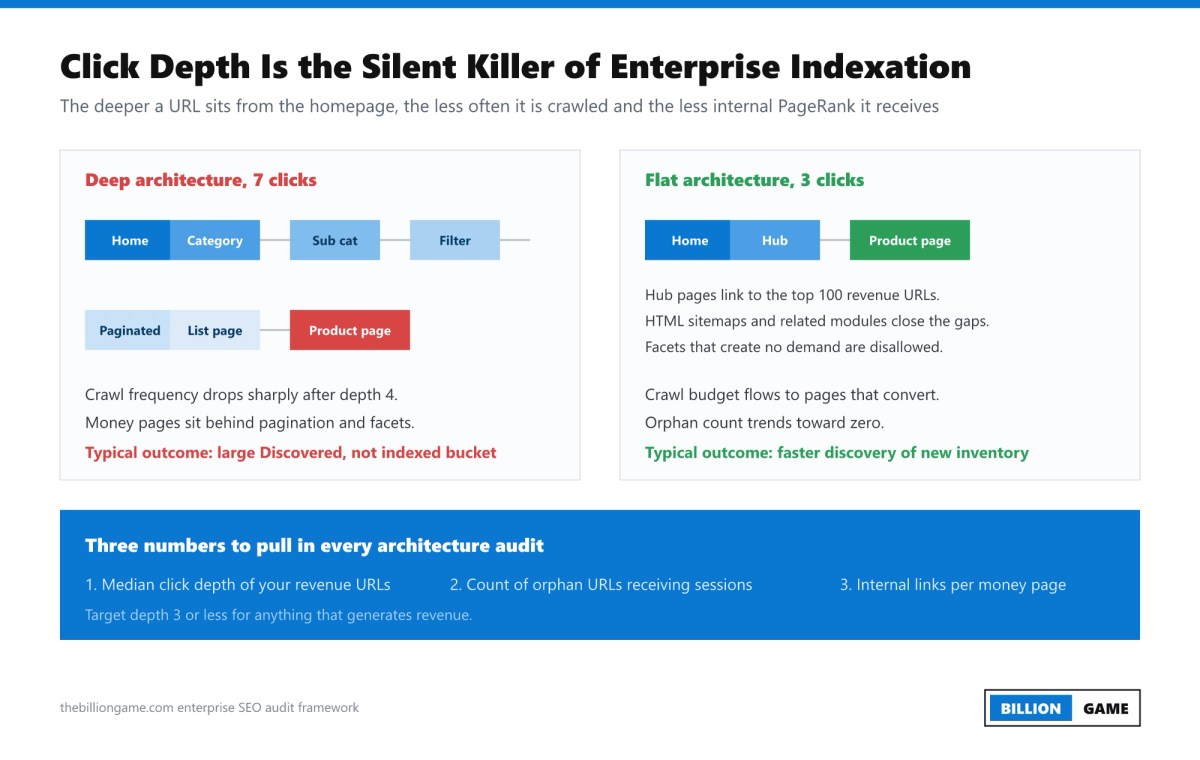
Measure:
- Median click depth of revenue URLs. Target three clicks or fewer from the homepage for anything that generates revenue. Depth correlates with crawl frequency and with internal PageRank.
- Inlink count distribution. Plot internal links per URL against sessions per URL. The scatter almost always shows a cluster of high-value, under-linked pages. That cluster is your fastest win in the entire audit.
- Orphan pages with traffic. URLs earning clicks with zero internal links are free revenue waiting to be protected.
- Anchor text patterns. At scale, templated modules generate the same anchor text at volume. Check whether "shop now" is your most common internal anchor.
- Pagination and infinite scroll handling. Confirm that paginated tails are reachable in raw HTML and not only through JavaScript events.
- Navigation link count. A mega menu that emits 400 links on every page flattens the link graph in the least useful way, spreading equity uniformly instead of directing it.
The practical fixes are template modules: related products, "customers also viewed", contextual editorial links, hub pages that point to the top 100 revenue URLs, and curated HTML sitemaps for deep inventory. Each is a one-time engineering change that keeps working.
Phase 6: Template-Level On-Page Audit
Do not audit pages. Sample templates.
Take 20 to 50 representative URLs per template and check the pattern, then extrapolate with the crawl data.
Per template, verify:
- Title tags. Is the pattern unique, does it front-load the head term, does it truncate badly at scale? Look for the classic enterprise failure of 40,000 titles rendering as "Product | Brand" with no differentiator.
- H1 and heading hierarchy. One H1, a logical H2 and H3 structure, and no headings used purely for styling.
- Meta descriptions. Templated is fine. Empty or duplicated across 100,000 URLs is not.
- Canonical tags. Self-referencing where appropriate, absolute URLs, consistent with hreflang and with the version in the sitemap. Canonical conflicts are the most common enterprise defect we find.
- Meta robots and X-Robots-Tag. Check the HTTP header as well as the HTML. Header-level noindex on a whole directory is a classic silent traffic killer.
- Structured data. Validate Product, Article, FAQ, BreadcrumbList, Organization and LocalBusiness markup against Google's rich result requirements. Check for required-property errors at scale rather than on one page.
- Hreflang. Return tags must be reciprocal, values must use valid ISO language and region codes, and every alternate must be indexable and self-canonical. On multi-region enterprise sites this is the single most frequently broken system.
- URL structure. Consistent casing, no session IDs, no uppercase and lowercase duplicates resolving to the same content.
Everything in this phase is a rule change, not a content change. That is what makes it cheap to ship. If you want the deeper crawl-and-render checklist that sits underneath this phase, our technical SEO audit process documents each check with its validation query.
Phase 7: Core Web Vitals and JavaScript Rendering
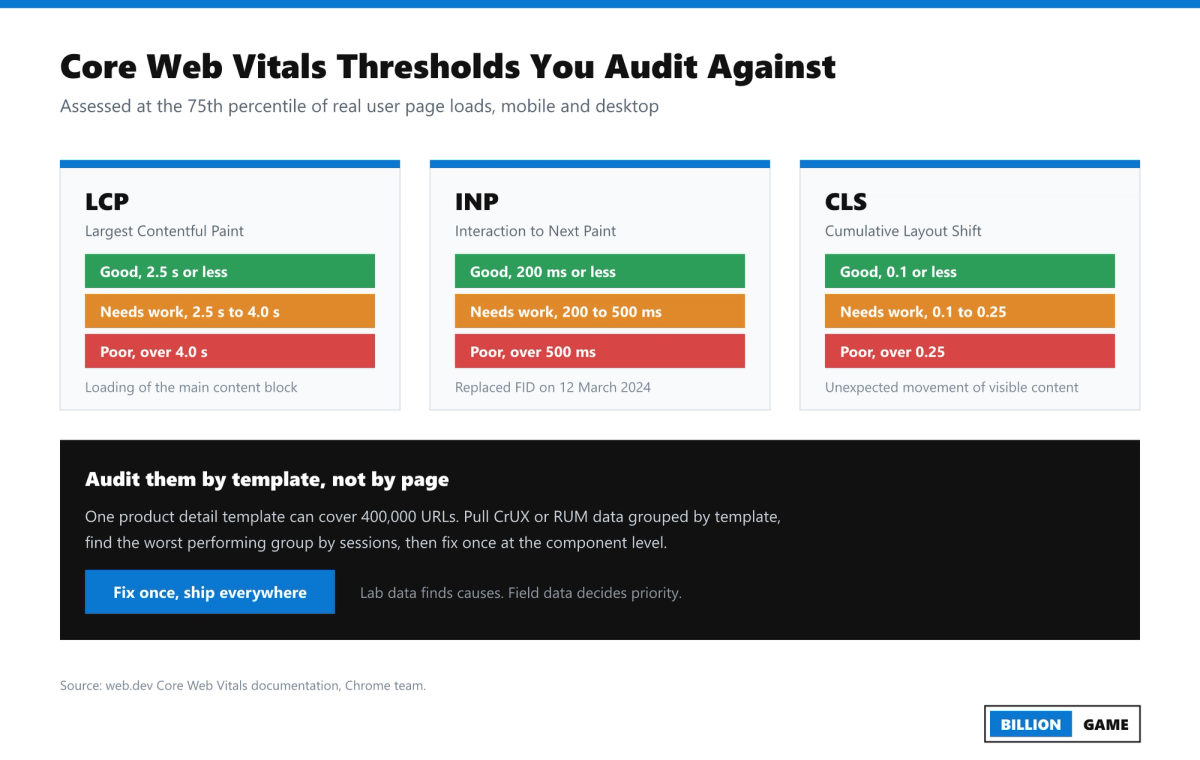
Core Web Vitals are three metrics with published thresholds, assessed at the 75th percentile of real user page loads across mobile and desktop:
| Metric | Good | Needs improvement | Poor |
|---|---|---|---|
| Largest Contentful Paint (LCP) | 2.5 s or less | 2.5 s to 4.0 s | Over 4.0 s |
| Interaction to Next Paint (INP) | 200 ms or less | 200 ms to 500 ms | Over 500 ms |
| Cumulative Layout Shift (CLS) | 0.1 or less | 0.1 to 0.25 | Over 0.25 |
INP replaced First Input Delay as a Core Web Vital on 12 March 2024, and it is the metric most enterprise sites now fail, because it measures every interaction across a session rather than only the first one. Heavy third-party tag stacks, personalisation scripts and A/B testing tools are the usual culprits.
Audit them by template group, weighted by sessions. A template with a poor LCP and 12 million monthly sessions outranks a template with a terrible LCP and 4,000 sessions every time. Use field data from CrUX to decide priority and lab data from Lighthouse to diagnose cause.
Rendering is the other half of this phase. Compare your raw HTML crawl against your rendered crawl and answer three questions:
- Is the primary content present in the initial HTML response, or injected by JavaScript?
- Are internal links real <a href> elements, or click handlers that Googlebot cannot follow?
- Do canonical, hreflang and meta robots values differ between raw and rendered HTML? If they do, treat it as a critical finding. Conflicting signals across the render boundary produce genuinely unpredictable indexing.
For large JavaScript applications, server-side rendering or static generation for indexable templates is usually the correct recommendation, and it is usually a P2 item: high impact, high effort, needs a funded project.
Phase 8: Content Quality and AI Visibility
Enterprise content audits are portfolio decisions, not editing exercises. Classify every URL into one of four actions using clicks, impressions, conversions, backlinks and cannibalisation data.
- Keep and maintain. Performing well, keep it fresh.
- Improve. Ranking positions 5 to 20 with real search demand behind them. This is where the fastest incremental revenue sits.
- Consolidate. Multiple URLs competing for the same intent. Merge into the strongest, redirect the rest.
- Remove or noindex. No clicks, no links, no conversions, no strategic purpose. Ahrefs' widely cited study found 96.55% of pages get no organic search traffic at all, and enterprise CMSs are exceptionally good at producing that kind of page.
Run cannibalisation detection at scale by grouping Search Console query data by query and counting distinct ranking URLs. Any query where three or more of your own URLs alternate in the results is a consolidation candidate.
Then audit AI visibility, because the SERP is no longer the destination. SparkToro's analysis of Similarweb clickstream data found 68.01% of US Google searches ended without a click to the open web between January and April 2026, up from 60.45% in 2024, with AI Overviews appearing on more than 20% of searches and cutting click-through rates sharply where they appear.
What to check in the AI visibility section of the audit:
- Whether your key entity pages are being cited in AI Overviews, ChatGPT, Perplexity and Gemini responses for your commercial queries. This is exactly what an AI citation audit is built to measure.
- Whether answers are extractable: clear question-shaped headings, a direct answer in the first 40 to 60 words under each heading, definition sentences, tables and lists rather than long undifferentiated prose.
- Whether entity signals are consistent: Organization schema, sameAs links, consistent naming across the site, author entities with credentials.
- Whether your robots and firewall rules block AI crawlers such as GPTBot, ClaudeBot, PerplexityBot and Google-Extended, which is a legitimate business choice but must be a deliberate one, documented in the audit rather than discovered by accident.
- Which of your pages are already earning citations, so you can reverse engineer the format that earned them.
Phase 9: Prioritise, Report and Ship
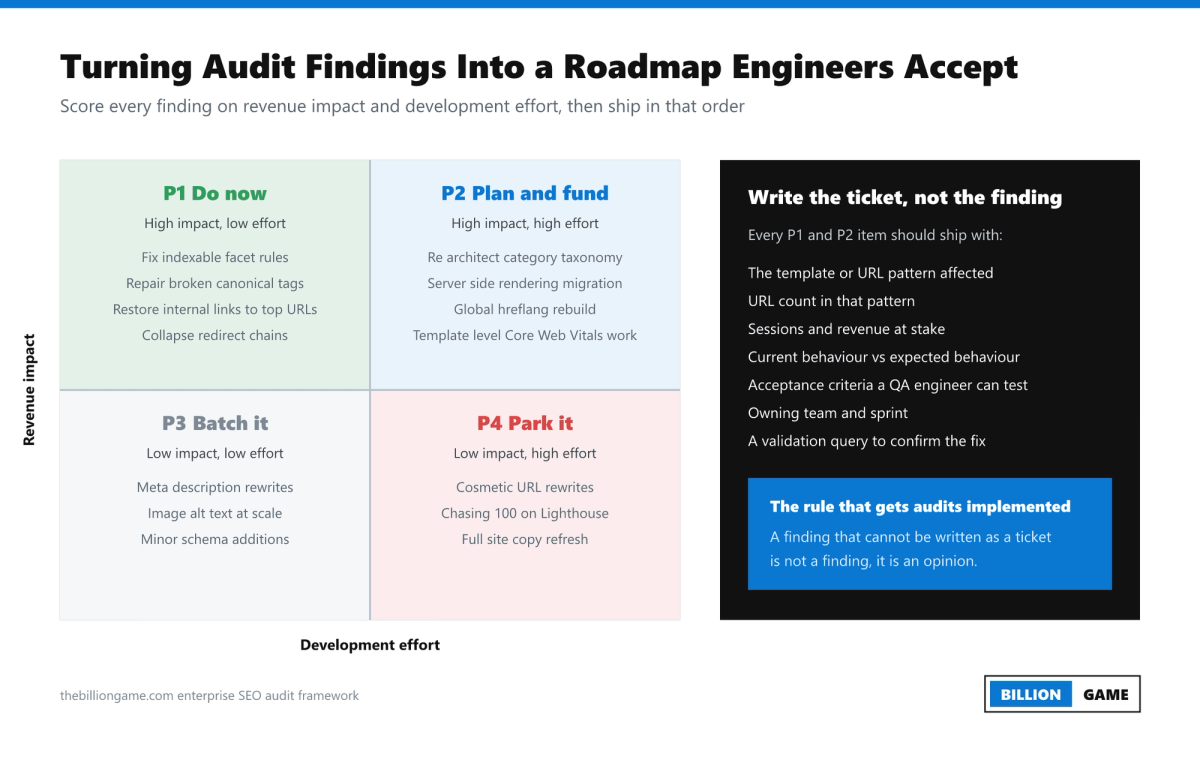
Score every finding on two axes, revenue impact and development effort, and sort into four buckets.
| Priority | Profile | Typical findings |
|---|---|---|
| P1, do now | High impact, low effort | Broken canonicals, accidental noindex, redirect chains, restoring internal links to top URLs, sitemap corrections |
| P2, plan and fund | High impact, high effort | Taxonomy rebuild, server-side rendering migration, global hreflang system, template-level Core Web Vitals work |
| P3, batch it | Low impact, low effort | Meta description patterns, alt text at scale, minor schema additions |
| P4, park it | Low impact, high effort | Cosmetic URL rewrites, chasing a perfect Lighthouse score, full-site copy refresh |
Estimate impact with a defensible model rather than a feeling. A workable one: affected URLs multiplied by current impressions, multiplied by a realistic CTR uplift for the position change you expect, multiplied by conversion rate and average order value. Publish the assumptions. A conservative model that stakeholders trust beats an aggressive model they dismiss.
Write findings as tickets. Each P1 and P2 item ships with the URL pattern affected, the URL count, sessions and revenue at stake, current versus expected behaviour, acceptance criteria a QA engineer can test, the owning team, and the validation query you will run after release to confirm the fix.
Report in three layers, because three different audiences will read this document:
- Executive summary, one page. The commercial question, the answer, the three things that matter, the estimated value and the ask.
- Programme view. The scored roadmap by quarter, with owners and dependencies.
- Technical appendix. Full findings, methodology, queries, data exports and reproduction steps.
Then set up validation. Track index coverage by segment, crawl requests by segment, click depth of revenue URLs and Core Web Vitals pass rate by template in a Looker Studio dashboard, and review monthly. If issue diagnosis and re-validation inside Search Console is the bottleneck, our Google Search Console issue fixing service exists specifically for that loop.
The Full Enterprise SEO Audit Checklist
Use this as a working checklist. Every item should end with a segment-level number, not a yes or no.
Crawlability
- robots.txt reviewed for accidental blocks on CSS, JS and revenue templates
- Robots directives verified in HTTP headers as well as HTML
- Crawl rate and server response times healthy under Googlebot load
- Faceted navigation rules documented and matching implementation
- Redirect chains and loops eliminated
- 4xx and 5xx rates monitored by segment
Indexation
- Page Indexing report analysed by segment
- Discovered, currently not indexed quantified and diagnosed
- Crawled, currently not indexed quantified and diagnosed
- Index bloat identified and a removal plan agreed
- XML sitemaps under 50,000 URLs and 50 MB per file, referenced in robots.txt
- lastmod accurate, priority and changefreq removed or ignored
- Canonical logic consistent across HTML, headers and sitemaps
Architecture
- Median click depth of revenue URLs measured
- Orphan URLs with sessions identified
- Internal link distribution mapped against revenue
- Pagination reachable without JavaScript
- Breadcrumbs implemented with BreadcrumbList schema
On-page, by template
- Title and H1 patterns unique and intent-matched
- Structured data valid against Google requirements
- Hreflang reciprocal, valid and self-canonical
- Image optimisation, alt text and lazy loading behaviour verified
Performance and rendering
- LCP, INP and CLS pass rates by template at the 75th percentile
- Raw HTML versus rendered DOM delta reviewed
- Third-party script inventory and INP contribution measured
- Mobile-first parity between mobile and desktop content
Content and authority
- Every URL classified keep, improve, consolidate or remove
- Cannibalisation clusters identified from Search Console query data
- E-E-A-T signals present on YMYL templates
- Backlink profile reviewed for toxicity, loss and internal redistribution
- AI citation share measured for priority commercial queries
Governance
- Findings scored P1 to P4 with impact model published
- Tickets written with acceptance criteria and owners
- Validation dashboard live
- Re-audit cadence agreed
How Often to Run One
Run a full deep-dive enterprise audit annually, a focused technical health check quarterly, and continuous automated monitoring in between. Add an unscheduled audit whenever any of these happen: a platform migration, a design system change, a CDN or hosting change, a large content merger or acquisition, or an unexplained double-digit drop in non-brand organic sessions.
Common Mistakes That Ruin Enterprise Audits
- Auditing pages instead of templates. Produces a 4,000 row spreadsheet nobody will ever action.
- Skipping log files. Without them you are guessing at crawl behaviour, and you will misdiagnose crawl budget problems as content problems.
- Reporting issue counts instead of revenue. "18,000 missing meta descriptions" gets ignored. "Category template canonical defect suppressing 240,000 URLs worth an estimated 62,000 monthly sessions" gets a sprint.
- Recommending fixes engineering cannot ship. If you do not know the release cycle and the platform constraints, half your roadmap is fiction.
- Ignoring internationalisation. On multi-region sites, hreflang defects routinely cost more traffic than anything on the technical checklist.
- Treating the audit as the finish line. The audit is the diagnosis. Implementation and validation are the treatment.
FAQs
How long does an enterprise SEO audit take?
Three to six weeks for a site between 100,000 and 10 million URLs. Roughly one week for access, data collection and crawling, two to three weeks for analysis across the nine phases, and one week to build the prioritised roadmap and present it. Log file extraction is usually the longest pole in the tent because it depends on another team.
What is the difference between an enterprise SEO audit and a technical SEO audit?
A technical SEO audit covers crawlability, indexability, performance and rendering. An enterprise SEO audit contains that technical work but adds content portfolio analysis, authority assessment, AI visibility, commercial impact modelling and the governance layer that gets fixes shipped across multiple teams.
Which tools do I need for an enterprise SEO audit?
At minimum a scalable crawler (Screaming Frog in database mode, Sitebulb, Lumar, Botify, OnCrawl or JetOctopus), a log file analyser, Google Search Console with API or BigQuery export access, GA4 or Adobe Analytics, the Chrome UX Report and PageSpeed Insights, and a backlink tool such as Ahrefs or Semrush. Looker Studio or a similar layer to join the datasets matters more than any single tool.
How do I audit a site with millions of URLs when crawlers time out?
Crawl by segment on a rotation rather than attempting one full crawl. Take a statistically meaningful sample per template, typically 5,000 to 20,000 URLs, and validate patterns against log and Search Console data across the full URL set. Pattern accuracy matters more than total coverage.
What is the most common issue found in enterprise SEO audits?
Index bloat combined with crawl waste. Faceted navigation, parameterised URLs and internal search results generate enormous URL inventories that consume crawl capacity while returning near-duplicate content, which starves genuinely valuable pages of crawl and index attention.
Do enterprise SEO audits still matter now that AI Overviews reduce clicks?
More, not less. With 68.01% of US Google searches ending without a click in early 2026, the clicks that remain concentrate on a smaller set of pages, and citation in AI answers depends on the same foundations an audit fixes: crawlability, clean extractable structure, consistent entity signals and demonstrable expertise.
Should I audit before or after a replatform?
Both. Audit before to establish a baseline, protect high-value URLs and build the redirect and parity requirements into the build spec. Audit again 2 to 4 weeks after launch to catch defects while they are still cheap to fix.
How do I get engineering to actually implement audit findings?
Write tickets, not findings. Give each item a URL pattern, an affected URL count, sessions and revenue at stake, expected behaviour, acceptance criteria and a validation query. Then bring the top three P1 items to sprint planning yourself rather than emailing a document.
Can I run an enterprise SEO audit in-house?
Yes, if you have log access, a scalable crawler, an analyst comfortable in BigQuery or SQL, and enough political capital to book engineering time. The most common reason teams bring in outside help is not skill, it is that an external audit carries the independence needed to get a P2 project funded.
How much organic traffic can an enterprise SEO audit recover?
It depends entirely on what is broken and what gets shipped. The honest framing is that an audit does not recover traffic, implementation does. Model the value per finding, publish your assumptions, and report on realised gains after each release rather than promising a headline percentage upfront.
How do you do an enterprise SEO audit?
Work in nine phases: scope and stakeholders, crawl at scale, indexation gap analysis, log file and crawl budget review, site architecture, template level on-page, Core Web Vitals and rendering, content and AI visibility, then prioritisation. The whole cycle takes three to six weeks on a site of 100,000 to 10 million URLs.
What is included in an enterprise SEO audit?
A prioritised findings register, engineering tickets with acceptance criteria for the high-priority items, a phased roadmap, a monitoring dashboard and a live debrief. Enterprise SEO audits analyse page templates rather than individual pages, because one template fix can propagate across hundreds of thousands of URLs.
How is an enterprise SEO audit different from a normal one?
Scale changes the unit of work. A standard audit reviews pages, while an enterprise audit reviews the systems that generate pages, meaning CMS templates, canonical logic and faceted navigation rules. It also joins crawl data with server logs and Search Console data, which a standard audit rarely does.
Where to Go From Here
The enterprise SEO audit is a diagnostic instrument, and its value is decided entirely by what happens in the twelve weeks after you present it. Get the scope right, join crawl data with log data and Search Console data, work at the template level, and convert every finding into a ticket somebody owns.
If you would rather see the same process from the buyer's side, including the team, the timeline and the deliverables you should demand, read how agencies perform technical SEO audits for enterprise sites.
If you want this run on your site by a team that works at this scale every week, The Billion Game runs the full nine-phase process end to end, including log file analysis, indexation gap modelling and the roadmap your engineering team will actually accept.
Sources and references: Google Search Central documentation on managing crawl budget for large sites, building and submitting sitemaps, and Googlebot file size limits (February 2026 clarification); web.dev Core Web Vitals documentation, Chrome team; SparkToro analysis of Similarweb clickstream data, January to April 2026; Ahrefs organic search traffic study.
Share
Ready to Hire an AI SEO Expert?
Book a free 30 minute AI Visibility Audit. We analyze your search visibility across Google, ChatGPT, Perplexity AI and AI Overviews.
About the author

Ganesh Shanmugam
Ganesh Shanmugam is an SEO and AEO consultant based in Chennai, India, and the founder of Billion Game — a boutique agency serving clients across the US, UK, Australia, Canada, and Ireland. He previously held SEO roles at 7 Eagles and Digital Scholar before going independent, and brings 4+ years of hands-on experience
AI SEO insights in your inbox
For growth-stage brands: organic traffic, AI citations, and strategy notes. No spam—unsubscribe anytime.
By subscribing you agree to our Privacy Policy.
![Page with Redirect in Google Search Console: What It Means and When to Fix It [2026]](https://cdn.sanity.io/images/s5479b37/production/7de4ccc9a0e966a6ac06e06715a36861c975060e-1920x1080.png?w=800&h=450)
![Schema Markup for AI Search: What Helps, What Is Hype [2026]](https://cdn.sanity.io/images/s5479b37/production/9048f007bedfd48b23a6d1cac59a0efa4dcebdb0-1920x1080.png?w=800&h=450)
![Blocked by robots.txt: What It Means and How to Fix It [2026]](https://cdn.sanity.io/images/s5479b37/production/38dc10abf9ae2217a085bd156468b04d39eef1aa-1920x1080.png?w=800&h=450)