
INDEXING
How to Check When a Page Was Indexed by Google (5 Ways That Actually Work)
 Ganesh Shanmugam10 min read
Learn how to check when a page was indexed by Google. Discover 5 methods, why Google hides the exact date, and how to find the closest answer fast.
You published a page. Google eventually showed it in search. But when exactly did that happen?
If you want to check when a page was indexed by Google, you will not find a field labelled "indexed on" anywhere. Google simply never publishes that date.
So this guide gives you the five closest answers instead. They range from a ten-second search to the exact timestamp sitting in your server logs. Along the way you will also learn why "last crawled" and "indexed" mean two different things, because that single mix-up sends most people looking in the wrong place.
Key Takeaways
- Google does not publish an exact index date. No tool shows it, including Search Console. Anything claiming otherwise is estimating.
- The closest answer is your Performance report. The first day your page recorded impressions tells you roughly when it started appearing in search.
- "Last crawl" is not the same as "indexed". Search Console shows when Googlebot last fetched your page, which is usually far more recent than the day it first appeared.
- A site: search answers "if", not "when". Use it for a ten-second yes or no.
- Server logs give you the real first crawl. If you can reach them, they hold the exact timestamp.
- Two old tricks are now dead. Google retired the cache: operator in 2024, and the "About this result" panel no longer shows a first indexed date. Ignore any guide still recommending either.
How Can You Check When a Page Was Indexed by Google?
Google never publishes the date a page was indexed, so you check it by triangulating Search Console, the Wayback Machine, a site: search and your server logs. Google treats indexing as an ongoing process rather than a single event, and pages get crawled, reprocessed, dropped and re-added continuously.
What you can do is triangulate. Each method below tells you something slightly different, and together they get you close.
| Method | What it tells you | Access needed | Time |
|---|---|---|---|
| URL Inspection | When Google last crawled the page | Search Console | 30 seconds |
| Performance report | When the page first appeared in search | Search Console | 2 minutes |
| Wayback Machine | When the page first existed publicly | None | 1 minute |
| site: search | Whether the page is indexed at all | None | 10 seconds |
| Server logs | The exact first Googlebot visit | Server or CDN access | 10+ minutes |
Pick based on what you actually need. If you want a date for a report, use the Performance report. If you only need to confirm the page is live in search, run a site: search and move on.
Method 1: Check When Google Last Crawled Your Page
The URL Inspection Tool in Google Search Console shows when Google last crawled your page, the most reliable date Google will share. Start here whenever you own the site.
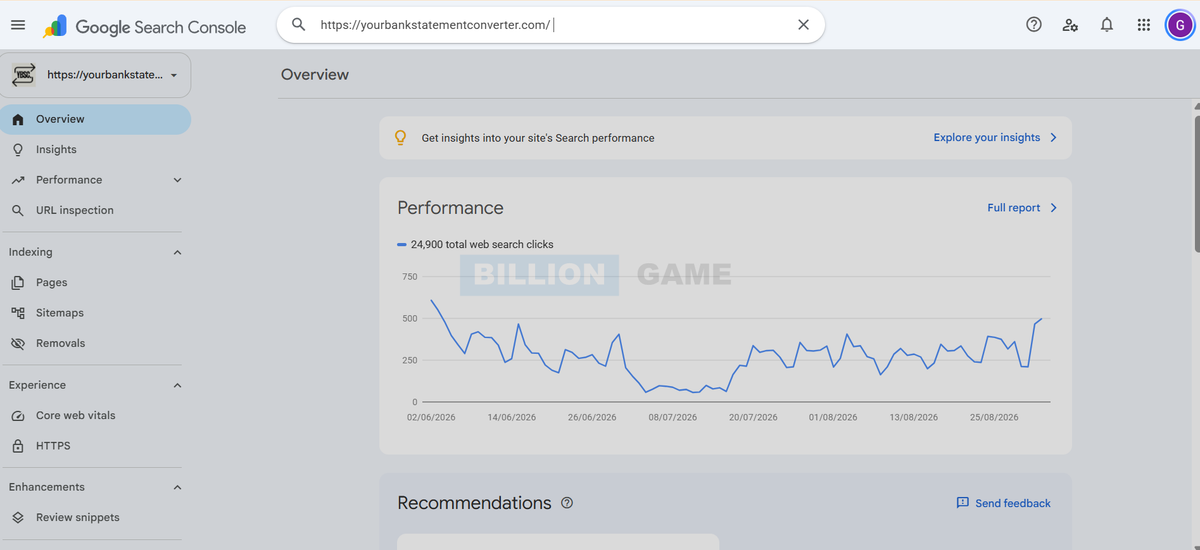
Follow these steps:
- Open Google Search Console and select your property.
- Paste the full URL into the inspection bar at the top, then press Enter.
- Wait a few seconds while Google retrieves the data.
- Read the status at the top of the result.
When the page is indexed, you will see "URL is on Google" with a green tick, and a "Page indexing" row confirming the page is indexed.
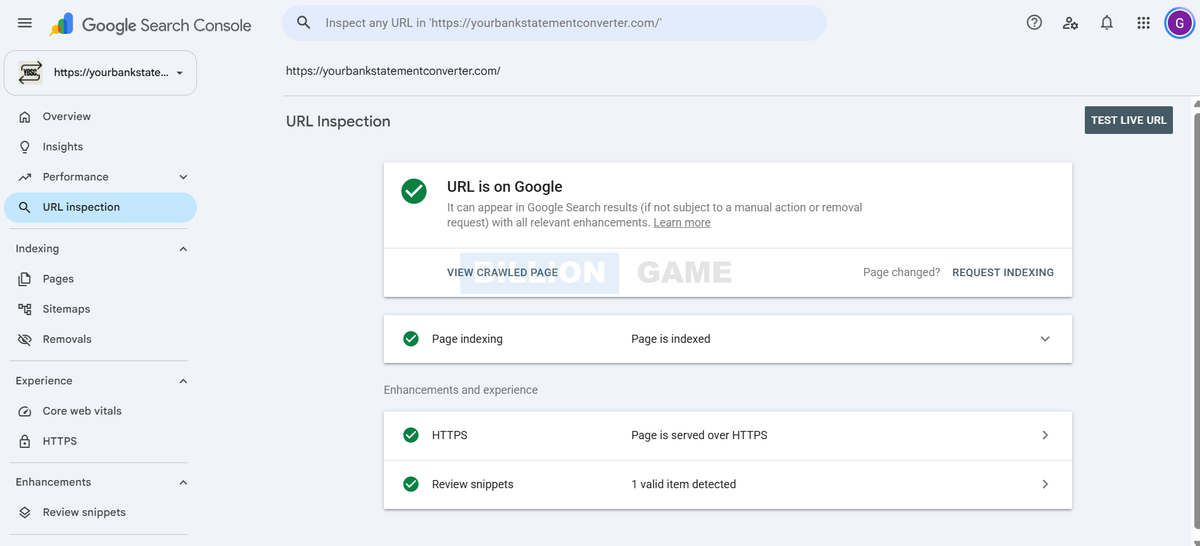
Now click to expand the details and scroll to the Crawl section. There you will find the Last crawl date and time.
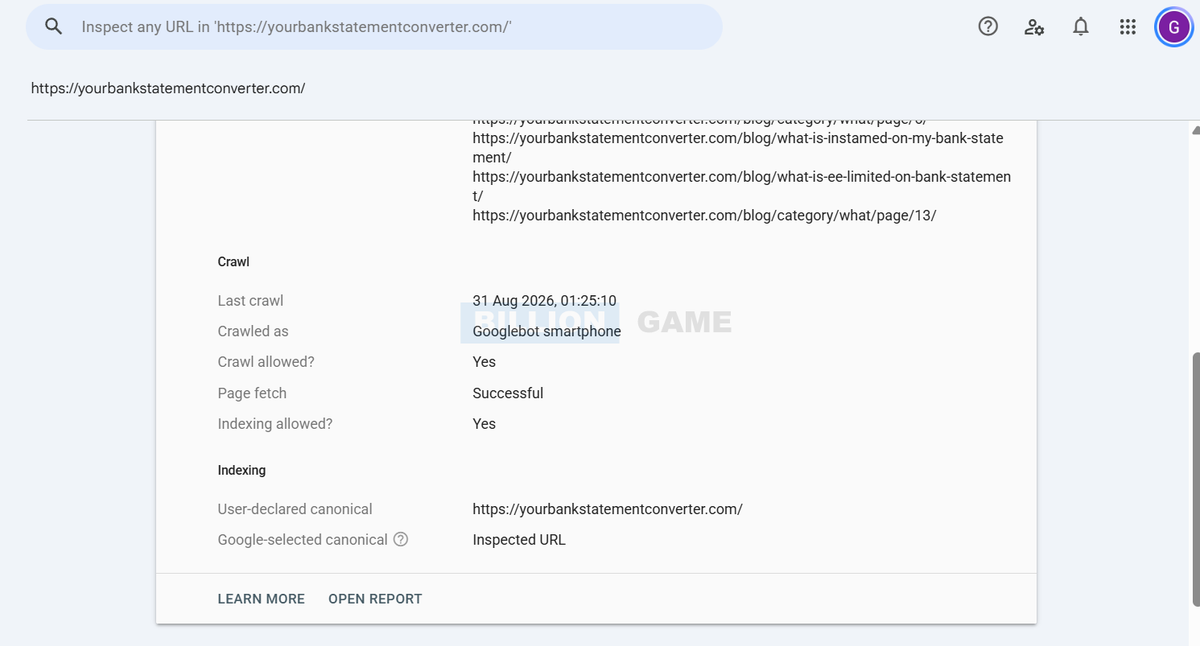
What "last crawl" actually means
Read that date carefully, because it trips up almost everyone.
Last crawl tells you when Googlebot most recently fetched your page. It does not tell you when the page was first indexed. Google re-crawls pages regularly, so a page published two years ago might show a last crawl date from yesterday.
In other words, this date answers "how fresh is Google's copy?" rather than "when did this page arrive?"
That distinction matters, so keep it in mind for the next method.
Method 2: Find When Your Page First Appeared in Search
The first day your page recorded impressions in the Search Console Performance report is the closest you can get to a real first-indexed date. It works because Google can only record impressions for a page that already sits in the index.
Follow these steps:
- In Search Console, open Performance, then Search results.
- Click Add filter, choose Page, and paste your URL.
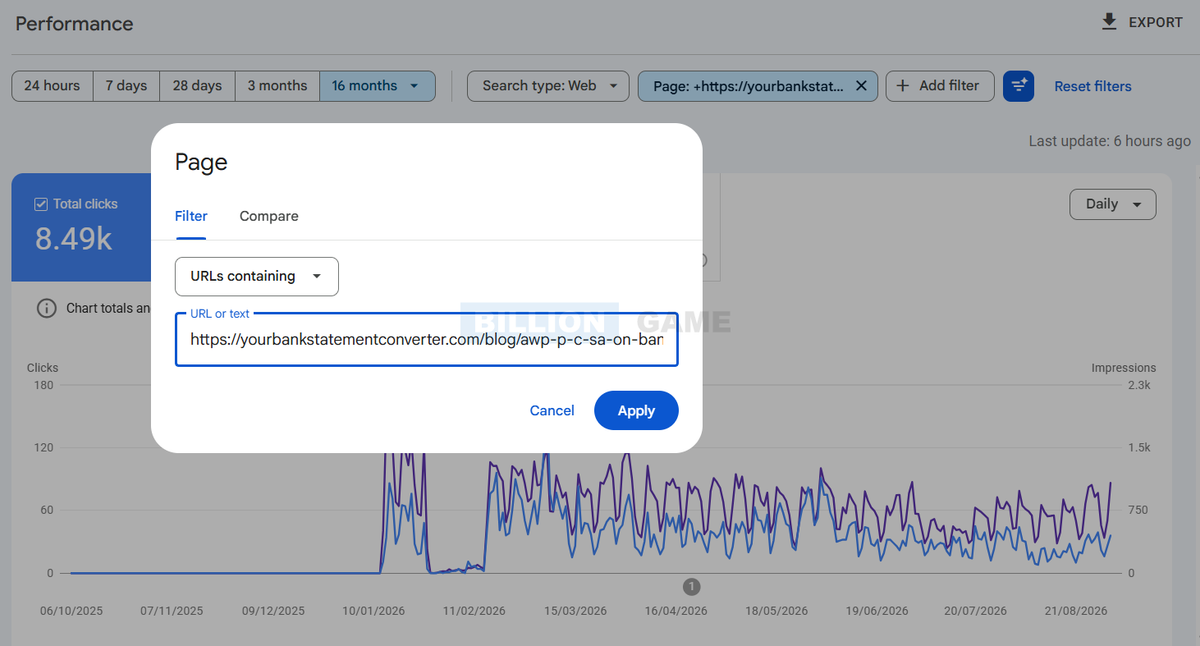
- Set the date range to 16 months, which is the maximum Search Console stores.
- Tick Impressions so the chart shows them.
- Hover over the point where the line lifts off zero.
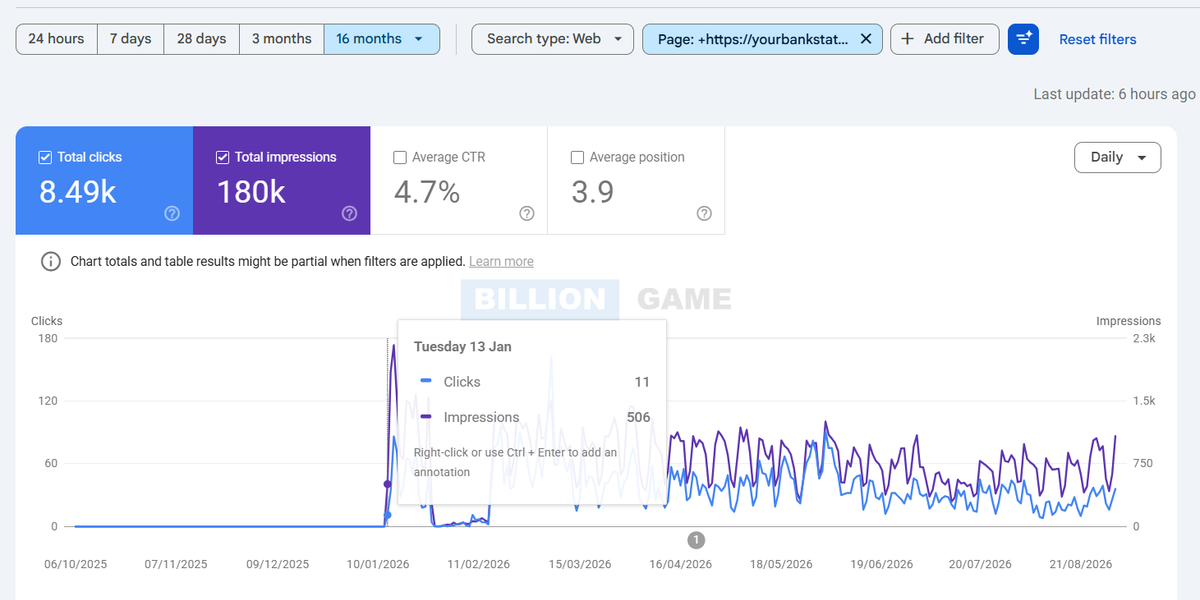
The first day with impressions is your best estimate of when the page entered the index. In the example above, the line sits flat at zero for months, then jumps on 13 January with 506 impressions and 11 clicks. That page almost certainly got indexed a day or two before.
A word of caution on the 16-month limit. Search Console keeps only 16 months of data. If your page went live before that window, the chart will show impressions from day one and you will not see the moment it started. In that case, fall back on Method 3 or your server logs.
One recent addition is worth knowing about. On 3 June 2026 Google launched generative AI performance reports in Search Console. They show your impressions inside AI Overviews, AI Mode and Discover, and the rollout finished worldwide at the end of August 2026. The report covers impressions, pages, countries and devices, but it does not include clicks yet, which Google says are coming. It will not give you an index date, because it only reports AI surfaces and starts from its own launch. Stick with the Search results report above for dating a page.
Method 3: Check the Wayback Machine for When the Page First Existed
The Wayback Machine dates a page when you cannot open Search Console, for example when you are checking a competitor or the page is older than the 16-month window. Its earliest capture shows when the page already existed publicly.
Follow these steps:
- Go to web.archive.org.
- Paste the full page URL into the search box.
- Look at the timeline and find the earliest capture.
That first capture tells you the page already existed publicly on that date. Because Google usually crawls a linked page well before an archive does, your real index date normally falls on or slightly before it.
Read this as an upper bound, not an exact date. The Wayback Machine records when the Internet Archive crawled the page, not when Google indexed it. Gaps are common too, since the archive does not capture every page or every site.
Even so, it remains the best free option for dating a page you do not own.
Method 4: Check If a Page Is Indexed With a site: Search
A site: search tells you whether Google has indexed a page, not when. Use it when you do not need a date at all.
Type this into Google, swapping in your own URL:
site:thebilliongame.com/blog/how-to-do-an-enterprise-seo-audit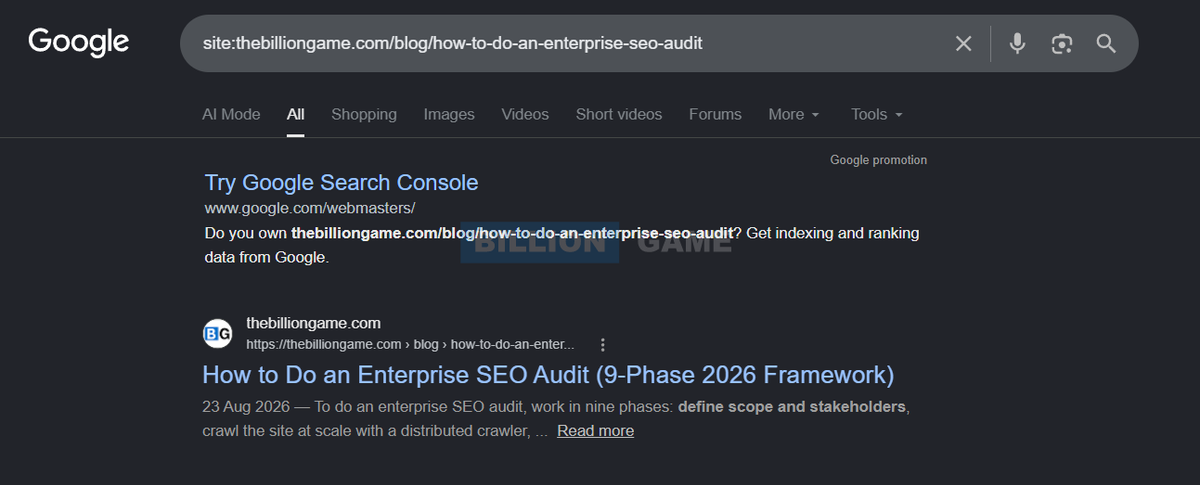
If the page appears, Google has indexed it. If nothing comes back, it has not.
Notice the date shown beside the snippet. That date reflects when Google thinks the content was published or last updated, not when it was indexed. Many people misread it, so do not rely on it for an index date.
One more caveat worth knowing: a site: search gives an approximation rather than a complete list. For anything precise, go back to Search Console.
Method 5: Find the Exact Index Date in Your Server Logs
Server logs give you the most accurate answer available, because they record every single visit from Googlebot.
Ask your developer or hosting provider for access logs covering the period after you published the page. Then search the logs for that URL and filter by the Googlebot user agent. The earliest matching entry shows exactly when Google first crawled it.
Indexing usually follows within hours or days of that first crawl, so this gets you very close.
Fair warning though: this method takes the most effort and needs technical access. Most people should stop at Method 2. Reach for logs when you need defensible evidence, such as a migration post-mortem or a dispute about when content went live.
What Is the Difference Between Crawled, Indexed and Ranking?
Crawled means Googlebot downloaded your page, indexed means Google stored it, and ranking means it shows up for a real search. Much of the confusion around index dates comes from people using these three words interchangeably.
- Crawled means Googlebot visited your page and downloaded it. Nothing more.
- Indexed means Google analysed the page and stored it, so it can now appear in results.
- Ranking means the page actually shows up for a search someone types.
A page can be crawled and never indexed. Similarly, a page can be indexed and still never rank for anything useful.
You can see all three in Search Console. The Page indexing report, for example, shows how many pages Google indexed against how many it skipped.
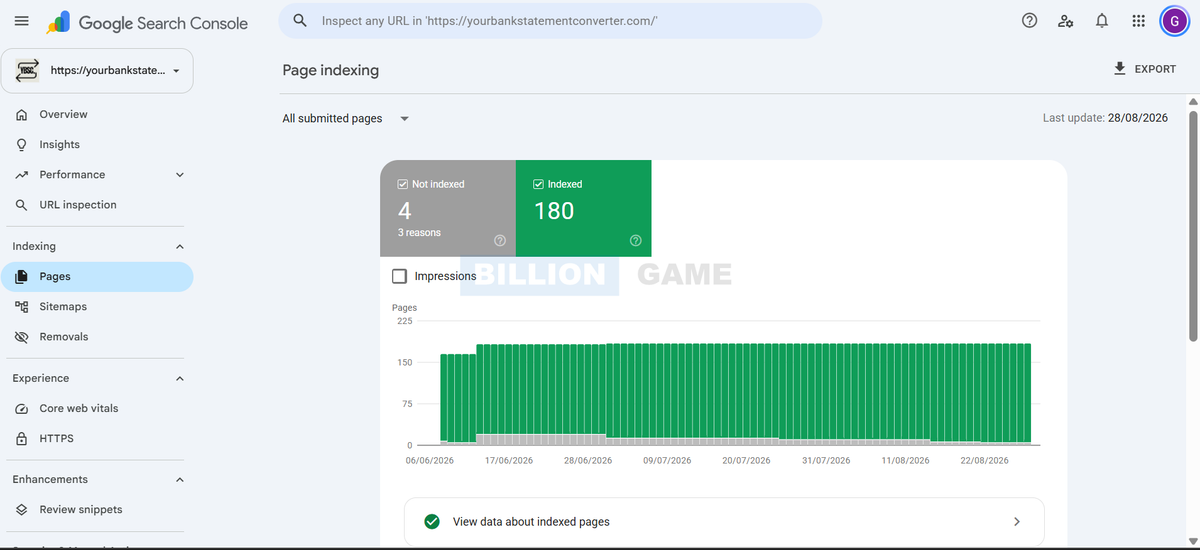
If your pages sit in the not-indexed group, our guide on fixing Crawled, currently not indexed in GSC walks through the usual causes.
What No Longer Works for Checking Google's Index Date
The cache: operator and the "About this result" first indexed date no longer work for checking when Google indexed a page. Plenty of older advice still circulates, and some of it now sends you nowhere.
The cache: operator is gone. Google retired cached links and the cache: search operator in 2024. Any guide telling you to type cache:yourdomain.com to see an index date is out of date. Use the Wayback Machine instead, as covered in Method 3.
"About this result" no longer shows a first indexed date. Older guides tell you to click the three dots beside a search result and read a "first indexed" line under Source. We checked in September 2026 and that date no longer appears. So if you go looking for it and find nothing, you are not doing it wrong. The feature simply is not there any more.
Most third-party "index date" tools estimate. They infer dates from publication metadata, sitemaps or their own crawl history. Treat their output as a guess rather than a fact.
The date in a search snippet is not an index date either. As covered above, it usually reflects publication or last update.
What Should You Do If Your Page Is Not Indexed Yet?
If your page is not indexed yet, start by inspecting the URL in Search Console, then work through these checks in order.
- Inspect the URL in Search Console and read the reason Google gives.
- Check for a noindex tag in your page source or HTTP headers, which is the most common accidental blocker.
- Confirm robots.txt allows crawling of that URL.
- Add internal links from pages Google already crawls, because orphaned pages get found slowly.
- Submit the URL with the Request Indexing button, then be patient.
- Check the content genuinely adds value, since Google skips thin or duplicate pages.
How long should you wait? John Mueller of Google has said most good content gets indexed within about a week. New sites with little authority often wait longer, sometimes several weeks.
When pages still refuse to index after that, something structural is usually wrong. Our Google Search Console issue fixing and Google indexing services exist for exactly that situation. For platform-specific steps, our guide on getting Google to index a WordPress site covers the common fixes.
FAQs About Checking When a Page Was Indexed
Can I see the exact date Google indexed my page?
No. Google does not publish an exact index date for any page. The closest available answer is the first day your page recorded impressions in the Search Console Performance report, which usually falls within a day or two of indexing.
What is the difference between last crawl and indexed date?
Last crawl shows when Googlebot most recently fetched your page, and Google re-crawls pages regularly. The indexed date would be when the page first entered Google's index. Search Console shows the first, never the second.
How long does Google take to index a page?
It varies from a few hours to several weeks. John Mueller has said most high-quality content gets indexed within about a week. Established sites that publish often tend to see faster indexing than brand new domains.
Does the `cache:` operator still show when Google indexed a page?
No. Google retired cached links and the `cache:` operator in 2024, so it no longer returns anything. Use URL Inspection or the Wayback Machine instead.
Why does a `site:` search show fewer pages than Search Console?
A `site:` search returns an approximation rather than a full index listing. Search Console reports directly from Google's own indexing data, so trust its numbers over the operator.
How often does Google re-crawl a page?
It depends on how often the page changes and how important Google considers it. News pages may be crawled several times a day, while a static page might wait weeks between visits.
Can I check when a competitor's page was indexed?
Only roughly, because you cannot open their Search Console. The Wayback Machine is your best option, since its earliest capture shows when the page already existed publicly. Treat that as an upper bound rather than an exact index date.
Does requesting indexing make it happen faster?
Sometimes, though it offers no guarantee. Request Indexing puts your URL in a queue rather than forcing an immediate index, and repeatedly submitting the same URL does not help.
What does first indexed by Google more than 10 years ago mean?
That wording came from Google's About this result panel, which used to show roughly when Google first indexed a source and capped the display at more than ten years for older sites. We checked in September 2026 and that date no longer appears, so you cannot rely on it any more.
How do I check when the page became indexed in Google?
Google never publishes an exact index date. The closest answer is the Performance report in Search Console: filter to the page, set the range to 16 months, and find the first day it recorded impressions. That usually falls within a day or two of indexing.
Can I see the exact date Google first crawled my site?
Only from your own server logs, which record every Googlebot request. Search Console shows the last crawl rather than the first, so logs are the one place an exact first-crawl timestamp exists.
What Is the Best Way to Check When Google Indexed a Page?
The best way to check when Google indexed a page is to combine three sources, because Google keeps its exact index dates private and nobody can hand you a perfect answer. Once you accept that, the practical path becomes simple.
Use URL Inspection for the last crawl date. Use the Performance report to find when the page first appeared. Then reach for server logs only when you need proof rather than an estimate.
That combination is how to check when a page was indexed by Google as accurately as anyone reasonably can. If your pages take too long to appear at all, the problem is rarely the date and usually the indexing itself, and our SEO audit will show you exactly where it breaks.
Share
Ready to Hire an AI SEO Expert?
Book a free 30 minute AI Visibility Audit. We analyze your search visibility across Google, ChatGPT, Perplexity AI and AI Overviews.
About the author

Ganesh Shanmugam
Ganesh Shanmugam is an SEO and AEO consultant based in Chennai, India, and the founder of Billion Game — a boutique agency serving clients across the US, UK, Australia, Canada, and Ireland. He previously held SEO roles at 7 Eagles and Digital Scholar before going independent, and brings 4+ years of hands-on experience
AI SEO insights in your inbox
For growth-stage brands: organic traffic, AI citations, and strategy notes. No spam—unsubscribe anytime.
By subscribing you agree to our Privacy Policy.
![Page with Redirect in Google Search Console: What It Means and When to Fix It [2026]](https://cdn.sanity.io/images/s5479b37/production/7de4ccc9a0e966a6ac06e06715a36861c975060e-1920x1080.png?w=800&h=450)
![Schema Markup for AI Search: What Helps, What Is Hype [2026]](https://cdn.sanity.io/images/s5479b37/production/9048f007bedfd48b23a6d1cac59a0efa4dcebdb0-1920x1080.png?w=800&h=450)
![Blocked by robots.txt: What It Means and How to Fix It [2026]](https://cdn.sanity.io/images/s5479b37/production/38dc10abf9ae2217a085bd156468b04d39eef1aa-1920x1080.png?w=800&h=450)